How to Read Your Milky Way Calendar
Your custom Milky Way Calendar is designed to help you quickly identify the best nights to photograph the Milky Way from your selected location.
Each calendar is generated for one specific location and year, using the coordinates you entered. This means the times shown in your calendar are adapted to the local time zone of that location.
Below, you’ll find a simple explanation of each section of the calendar and how to use it for planning your Milky Way photography sessions.
Date
The Date column shows the Saturday used as a reference for that row.
Remember that the calendar is designed around Saturday nights, but nearby dates usually have similar conditions.
Why does the calendar only show Saturdays?
To keep the calendar clear, printable, and easy to use, it shows data for Saturdays only.
In most cases, the two days before and two days after each Saturday will have similar Milky Way and moon conditions.
For example, if Saturday, June 20, is a good night to photograph the Milky Way, the nights around that date will usually be good as well.
This format gives you a clean overview of the best periods of the year without making the calendar too crowded.
Moon
The Moon section helps you understand how moonlight will affect Milky Way visibility.
Moonlight is one of the most important factors when planning Milky Way photography. A bright moon can wash out the sky and make the Milky Way much harder to see or photograph.
Your calendar may include:
Moon illumination
This shows how bright the moon is, expressed as a percentage.
Lower moon illumination is better for photographing the Milky Way. A very bright moon can reduce contrast in the night sky and make the Galactic Center harder to capture.
As a general rule, the darker the moon conditions, the better the night will be for Milky Way photography.
Moonrise
This is the time when the moon rises above the horizon.
If the moon rises after your Milky Way shooting window, it may not affect your session much. If the moon rises during the best Milky Way visibility window, it may reduce sky contrast.
Moonset
This is the time when the moon sets below the horizon.
If the moon sets before the Milky Way becomes visible, conditions can improve significantly after moonset.
What does “+1” mean?
If you see “+1” next to a moonrise or moonset time, it means that the event happens after midnight, on the following calendar day.
For example:
1:30 AM +1
This means 1:30 AM on the next day, not on the date shown in that row.
We use this to describe moonrise or moonset since these events can happen before or after sunset, so it’s a way to determine the impact that will have on Milky Way visibility.
Sun
The Sun section shows sunset and sunrise times for your selected location.
The Milky Way can only be photographed properly when the sky is dark enough. This means your useful shooting window will usually happen between sunset and sunrise, and more specifically during the darkest part of the night.
Sunset
This is when the sun goes below the horizon.
However, the sky will not be fully dark immediately after sunset. You’ll still need to wait until twilight ends before the Milky Way becomes clearly visible.
Sunrise
This is when the sun rises above the horizon.
Before sunrise, the sky will start getting brighter during morning twilight, which can reduce Milky Way visibility.
Milky Way visibility
The Milky Way visibility section shows when the Milky Way is above the horizon from your selected location.
This section includes:
- Start time
- End time
- Total visibility time
This tells you when the Milky Way is physically visible in the sky, but it does not necessarily mean that the Galactic Center is visible or that conditions are ideal for photography.
For Milky Way photography, the most important part of the calendar is usually the Galactic Center visibility.
Galactic Center visibility
The Galactic Center is the brightest, most detailed, and most photogenic region of the Milky Way.
This section shows when the Galactic Center is visible from your selected location, taking into account the date, time, location, darkness, and moon conditions.
This is usually the most important section of the calendar when planning a Milky Way photo session.
Your calendar includes:
- Start time
- End time
- Total visibility time
The longer the Galactic Center is visible during dark conditions, the better your chances of planning a successful Milky Way shoot.
Average Galactic Center elevation
The average Galactic Center elevation shows how high the Galactic Center is above the horizon during its visibility window.
This is useful for planning your composition.
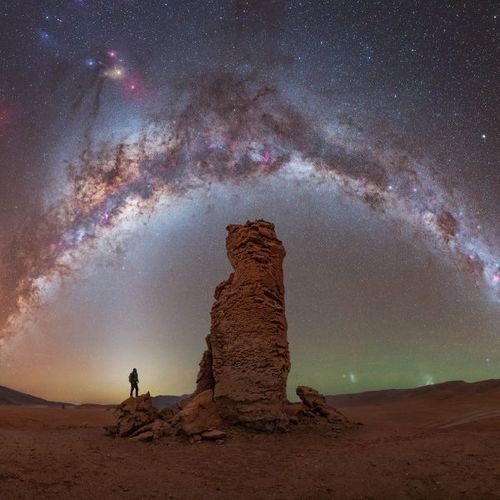
A lower elevation usually works better for wide landscape compositions where the Milky Way arch appears closer to the horizon.
A higher elevation can be better for vertical compositions, diagonal Milky Way shots, or panoramas where the core rises higher in the sky.
As a general reference:
- Low elevation (<60°): better for Milky Way arches
- Medium elevation: useful for balanced landscape compositions
- High elevation (>80°): useful for vertical Milky Way shots
The best elevation depends on your location, foreground, lens, and the type of composition you want to create.
Quick questions
Why are some dates better than others?
The best Milky Way photography nights usually happen when several factors align:
- The Galactic Center is visible
- The sky is dark
- The moon is not too bright or below the horizon during the best visibility window
- The Milky Way is visible for enough time to plan and shoot comfortably
Some dates may show very short visibility windows, while others may offer several hours of good conditions.
Why does my calendar show no visibility on some dates?
Some dates may not show Milky Way or Galactic Center visibility because the conditions are not suitable from your selected location.
This can happen when:
- The Galactic Center is below the horizon
- The sky does not get dark enough
- The moon interferes with visibility
- The visibility window is too short
- The season is not favorable for that latitude
This is normal, especially at higher latitudes or during parts of the year when the Milky Way core is not well positioned.
Why is a specific day not shown?
Your calendar only shows Saturdays to keep the file clear and easy to read.
If you are planning to shoot on another day of the week, use the closest Saturday as a reference. The dates around each Saturday usually have similar Milky Way and moon conditions.
What does “+1” mean?
It means the event happens after midnight, on the following calendar day.
What does average Galactic Center elevation mean?
It shows the average height of the Galactic Center above the horizon during its visibility window. This helps you plan whether the Milky Way will work better as an arch, diagonal band, vertical composition, or panorama.
Why does my calendar only show Saturdays?
To keep the calendar clean, printable, and easy to use. Nearby dates usually have similar conditions.
Can I use my calendar for nearby locations?
Yes, it can be a useful reference for nearby places. However, for maximum accuracy, we recommend generating a custom calendar for the exact coordinates of your shooting location.
Why is my free generic calendar different from my custom calendar?
Free generic calendars are based on approximate latitude regions. Custom calendars are generated for your exact coordinates and show times in the local time zone of your selected location.
Does the calendar guarantee that I will see the Milky Way?
No. The calendar shows astronomical visibility, but weather, clouds, smoke, haze, light pollution, terrain, and local access can affect real conditions.
What should I check before going out?
Before your shoot, check the weather, cloud coverage, moon conditions, light pollution, road access, safety, and any local restrictions.

Follow our adventures and trips on instagram
Maximize your custom Milky Way calendar